Core Features and Functions

1. Structured Asset Intake / Ingestion
Bring digital assets into the system in a more organised way.
MY1DAM Portal helps teams collect, organise and prepare files before they become managed assets. Instead of files being scattered across folders or submitted informally, asset intake can follow a clearer structure.
Helps you:
- collect files in a more controlled way
- reduce messy or incomplete asset submissions
- prepare assets for review, organisation or catalogue entry
- separate incoming files from approved assets
2. Digital Asset Catalogue
Create a structured library of approved assets.
MY1DAM Portal supports a searchable asset catalogue where approved files can be recorded, organised and reused. This helps teams move away from relying only on shared folders or personal file memory.
Helps you:
- find approved assets more easily
- reduce duplicated files and repeated work
- separate official assets from drafts
- build a more trusted asset library
3. Structured Asset Requests
Capture asset needs clearly from the beginning.
Users can submit requests for new assets, existing assets or changes to existing assets. Each request can include relevant instructions, supporting files and purpose.
Helps you:
- reduce vague or incomplete requests
- keep request information in one place
- improve communication between teams
- start asset work with clearer requirements
4. Asset Search & Discovery
Help users find the right files faster.
MY1DAM Portal improves asset searchability by supporting organised records and asset information, so users do not need to rely only on folder names or asking colleagues.
Helps you:
- reduce time spent searching for files
- improve asset reuse
- avoid recreating assets that already exist
- support faster marketing, sales and operational work
5. Asset Metadata
Add useful information to every asset.
Asset metadata helps users understand what an asset is, how it should be used, what status it carries and where it belongs.
Helps you:
- describe assets more clearly
- improve search accuracy
- support better classification
- make files easier to manage over time
Examples of useful metadata include asset name, asset type, category, status, version, owner, usage context and lifecycle status.
6. Controlled Asset Requests
Route and manage asset requests through a proper process.
While structured requests capture the need, controlled asset requests help ensure that each request moves through the right operating path instead of becoming an informal folder task.
Helps you:
- classify requests properly
- route work to the right person or role
- avoid unmanaged file handling
- keep requests visible until completion
7. Asset Tasks & Assignment
Turn asset requests into clear, trackable work.
MY1DAM Portal helps assign asset-related work to the right person, group or role. Users can see what needs to be done, what files are involved and what stage the work is at.
Helps you:
- make responsibility clear
- reduce file chasing and repeated reminders
- improve coordination between requesters, contributors and reviewers
- track work from request to completion
8. Review & Approval Control
Protect asset quality before use.
Submitted work can be reviewed, approved, returned for revision or rejected before it becomes an official asset.
Helps you:
- avoid using unapproved files
- improve accuracy and consistency
- protect brand quality
- create accountability in the approval process
9. Asset Promotion
Convert approved work into official assets.
MY1DAM Portal separates working files from official catalogue assets. A file becomes official only after it has passed review and is promoted into the correct asset catalogue.
Helps you:
- prevent draft files from being treated as final
- keep official assets trusted
- support asset reuse
- maintain a clear asset record
10. Version Awareness
Know which asset version is current.
MY1DAM Portal helps users distinguish between drafts, previous versions, current approved assets and released outputs.
Helps you:
- reduce wrong-version usage
- avoid confusion between draft and final files
- support better asset history
- improve confidence when reusing assets
11. Asset Lifecycle Status
Understand where each asset stands.
Assets can carry lifecycle information such as active, approved, archived, restricted, expired or pending further action.
Helps you:
- avoid using outdated assets
- manage asset availability
- support controlled asset retirement
- keep the catalogue cleaner and more reliable

12. Rights & Usage Awareness
Support responsible asset use.
MY1DAM Portal can help teams record and view usage-related information so users understand whether an asset is cleared, restricted or requires care before use.
Helps you:
- reduce misuse risk
- support brand and legal discipline
- guide users on proper asset usage
- improve governance confidence
13. Controlled Release & Downloads
Release the right file at the right stage.
MY1DAM Portal helps ensure that users access approved files through a controlled release or download process, instead of relying on manual file sharing.
Helps you:
- avoid sending the wrong file
- protect approved final assets
- control when assets are made available
- give users a clear download point
14. Asset Traceability
Follow the journey of an asset.
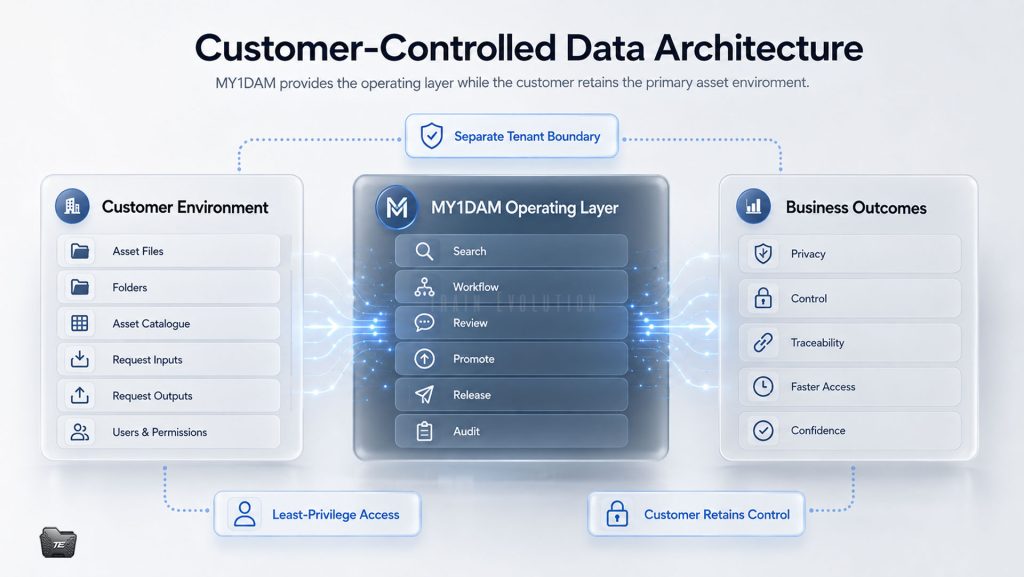
MY1DAM Portal helps connect the path from request to work, review, approval, catalogue entry and release.
Helps you:
- understand how an asset was created
- see what was reviewed and approved
- know what was released
- support audit and operational accountability
15. Structured Folder & File Organisation
Keep files organised by purpose.
MY1DAM Portal supports clearer separation between request inputs, working files, submissions, approved assets and released files.
Helps you:
- reduce messy shared folders
- keep source files and final outputs separate
- organise files by request or asset purpose
- make file handling easier for teams
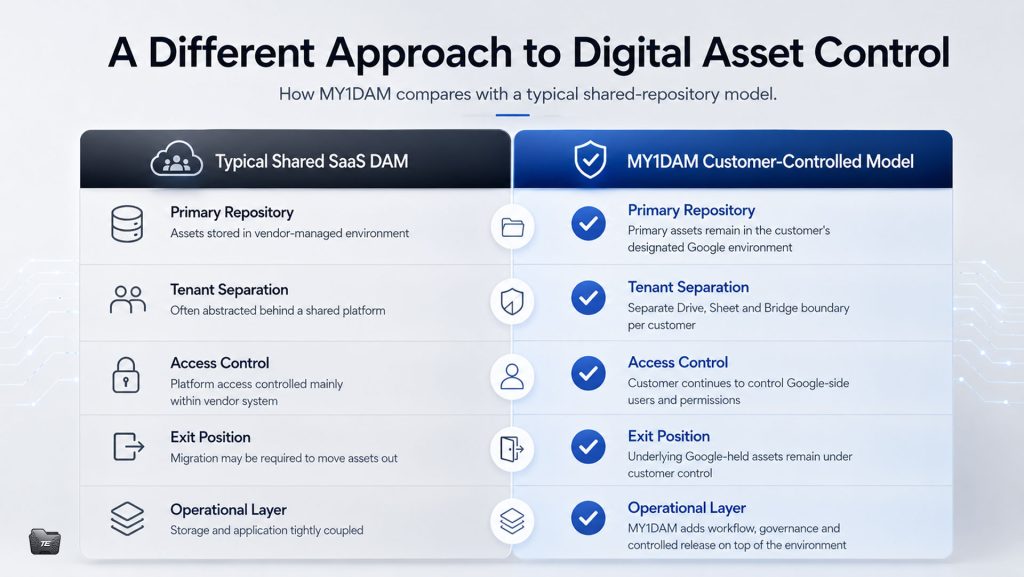
16. Customer-Specific Asset Environment
Keep each customer’s assets properly separated.
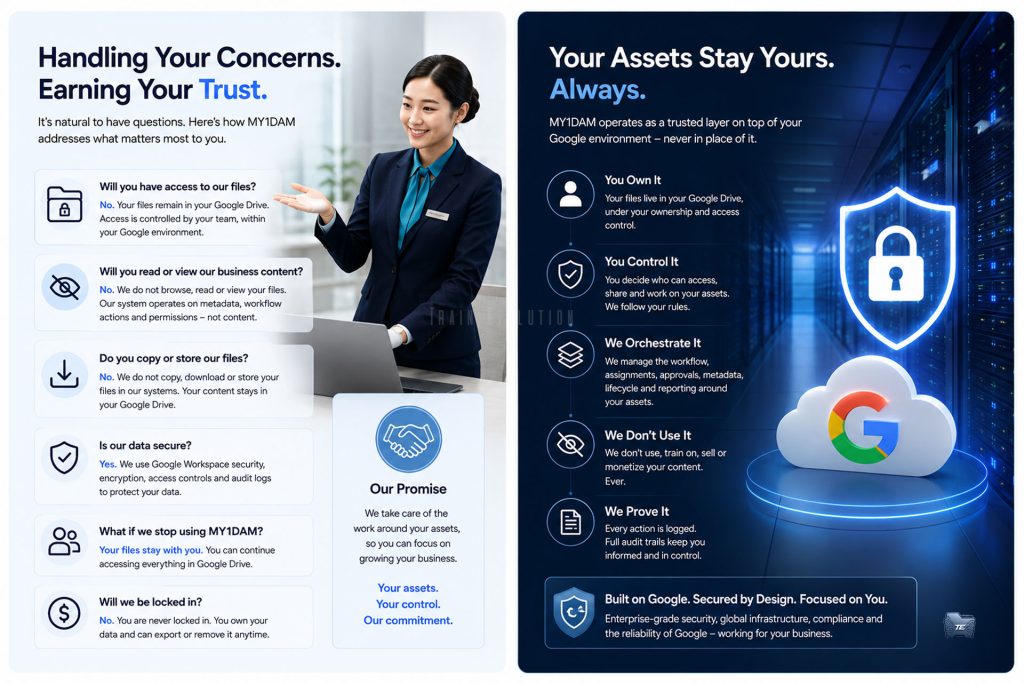
MY1DAM Portal is designed around dedicated customer environments, so each customer’s files, catalogue and asset records remain connected to their own operating space.
Helps you:
- maintain customer separation
- support safer asset handling
- keep catalogues clean
- avoid mixing unrelated assets or records
17. Role-Based Workspaces
Show users the tools relevant to their responsibility.
Different users may need different views depending on whether they are requesting, contributing, reviewing, managing, administering or downloading assets.
Helps you:
- reduce user confusion
- protect operational control
- guide users to the right action
- support different responsibilities in one workflow
18. Guided Workflow
Move asset work through a clear process.
MY1DAM Portal supports a structured asset workflow:
Brief → Work → Review → Promote → Release
This helps teams avoid treating uploaded files as approved assets before the proper checks are completed.
Helps you:
- separate drafts from approved assets
- improve quality control
- reduce version confusion
- create a more disciplined asset process
19. Progress Tracking
Give users visibility without constant follow-up.
Users can track request status, assigned work, completed outputs and released files through the portal.
Helps you:
- reduce manual follow-up
- improve request visibility
- keep users informed
- create a clearer service experience